Thursday, 5 June 2014

Companies Join 'Reset The Net' To Fight NSA

 Visit the Campaign

Big name opponents of the National Security Agency's (NSA) mass surveillance techniques are joining forces for "Reset the Net," an Internet-wide protest against the U.S. spy agency to be held on June 5. The protest will include a large Thunderclap on Thursday, blanketing social media with an anti-surveillance message.
Among those supporting Reset the Net are Reddit, Greenpeace, ACLU, DuckDuckGo, and the Electronic Frontier Foundation (EFF). Together they will promote encryption tools, implement additional anti-NSA security options on Web sites and services, or simply spread the message. A similar campaign was used to successfully fight SOPA (Stop Online Piracy Act), an anti-piracy bill that could have damaged the Internet.

Hurting The Internet
The basis for the Reset the Net campaign is that mass surveillance ultimately hurts the Internet, and therefore, it needs to be stopped or at least reformed. Many of the companies supporting the campaign have major stakes in the Internet's future, as Web sites like Reddit simply would not exist as they currently do with a more restricted Internet.
Thunderclap, a "crowdspeaking" platform, will be used by those involved with the campaign to increase the effect of their social media posts. Although individuals posting about the NSA won't have much of an effect but when millions of people post about the NSA, it is hard for their message to not be heard.
"Mass surveillance is toxic for the Internet," according to the EFF's blog post about Reset the Net. "The Internet is a powerful force that can promote democracy, innovation, and creativity, but it’s being subverted as a tool for government spying. That’s why EFF has joined with dozens of other organizations in calling for a day of action to Reset the Net."

Improving Security

Part of Reset the Net may be spreading the message about the NSA and its surveillance but that is not the only goal of the campaign. Those involved with Reset the Net are also trying to promote the use of more advanced encryption and security tools by informing people about them and getting "hundreds of sites & apps" to take advantage of the tools that are available.
On its Tumblr page, the campaign's organizers laid out a basic framework so that Web sites understand which security features they need to implement. "HTTPS, HSTS, and PFS (perfect forward secrecy) are powerful tools that make mass spying much more difficult," according to Reset the Net leaders. "Until Web sites use them, we’re sunk: agencies like the NSA can spy on everything. Once they’re ubiquitous, mass surveillance is much harder and more precarious -- even if you’re the NSA."
Reset the Net admitted that it is difficult to tell how beneficial the security technologies are because the NSA's capabilities are not fully known, but there are some noticeable benefits. With simple security features like HTTPS, Reset the Net said that Web sites can be protected from the vast majority of prying eyes.


Liked us? Like and Follow here:


Wednesday, 21 May 2014

Password changing dance starts now: eBay accounts data compromised


If you have an eBay account, it's time to change your password. The company released a statement today saying their internal and customer databases were compromised earlier this year, and starting today they'll prompt everyone to change their passwords.

Attackers made off with names, addresses, email addresses, phone numbers, birth dates, and of course, encrypted passwords. eBay explained that financial info like credit card numbers and other sensitive data (like PayPal accounts) are kept in a separate encrypted database which wasn't compromised. They also said they've found no evidence of unauthorized access or activity by registered eBay users—which is code for "we don't think anyone's used these passwords yet." According to the statement, intruders compromised employee accounts first, and used their access to get the data they really wanted. They discovered the breach about two weeks ago, but the actual attack took place back in late February and early March.

To change your eBay password, log into your account, then click your name in the upper left corner. Select Account Settings. Click "Personal Information" on the left side of the page, and "edit" next to your password.

As always, if you use the same password on multiple sites, first, change those too, and second, stop using the same password on multiple sites. Instead, use a password manager that generates and remembers strong passwords for all the sites you use around the web.

Keep reading.
We write because you read. :)

China Bans Microsoft Windows 8 for Government Computers


While US government is always prohibiting the purchase of Huawei products due to suspected backdoors from the Chinese government, China also keep itself totally apart from the US productions.

China is a bit famous for using its own operating systems, smartphone application services and lots more, rather than using the US developed Operating Systems, and now China has reportedly banned the installation of Microsoft Corporation’s latest operating system, Windows 8 on any of its government computers.
The Central Government Procurement Center issued a notice that was posted on its website last week prohibiting the use of Microsoft's latest operating system and the reason behind it is to support the use of energy-saving products, the report said.

But the state news agency ‘Xinhua’ pointed out a different reason for the ban saying the country wants to avoid any further losing of the support for an operating system like it did recently by pulling out its support from the oldest operating system Windows XP, which was widely used in China and is still estimated to be used on as much as half of the Chinese desktop market, the Chinese news agency claimed.
In the beginning of last month, Microsoft stopped providing the support for its longest running and most successful 13 year old Operating system, Windows XP, despite the fact that it has been used widely across the world than any other OS.

According to China's Central Government Procurement Center, all the desktops, laptops, and tablets used by central state agencies must run on an OS other than Windows 8. "All computer products are not allowed to install the Windows 8 operating system," reads the post on the center's website.
The ban applies only to the government offices, however the market of personal computers remains unaffected. Till now, Microsoft didn’t respond to comment on the issue.

Keep reading..
We write because you read :)

Tuesday, 20 May 2014

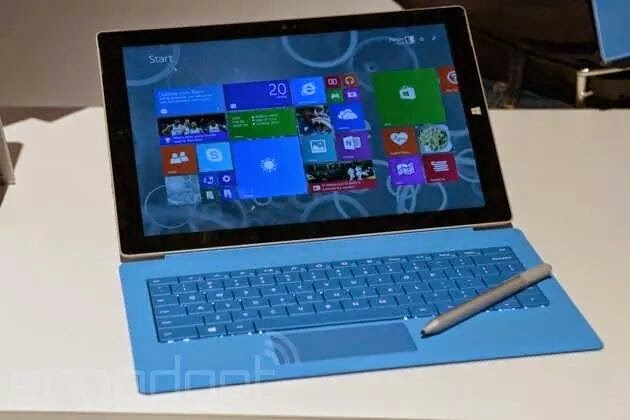
Microsoft Unveils 12-Inch Surface Pro 3


Software giant Microsoft unveiled its latest attempt to combine the power of a notebook computer with a tablet, the Surface Pro 3, at an event in New York.

Sporting a 12-inch display, it’s not the mini version that has been the subject of rumors. But the company says at 9.1 millimeters thick and 800 grams, it’s the thinnest and lightest of its kind. It also sports an Intel Core I7 processor.

Prices start at $799 and will be available for pre-order on May 21 and in stores on June 20.

Microsoft CEO Satya Nadella called it a major step in what he termed “the journey toward combining the capabilities of the company.”

Panos Panay, Microsoft’s vice president for Surface computing, said that 96 percent of people who have an iPad also have a notebook, creating for users a level of complexity. The new device, he said, is focused on “taking that conflict away.”

Patrick Moorhead, head of the research firm Moor Insights and Strategy, described it as a “flanking maneuver” for Microsoft versus Apple’s iPad.

“Microsoft is clearly focused on the ultimate productivity device, not focused on purely content consumption,” he said. “While Microsoft has not yet hit the high volume seven-to-eight inch tablet segment, Microsoft is clearly steering away from a straight-on confrontation with Apple.”

Panay spent a lot of time in his presentation playing up the combination of the Surface Pro 3’s capabilities. Adobe has created a version of its Photoshop photo-editing software that is optimized for running on the Surface. But Panay also demonstrated an app designed to emulate the New York Times crossword puzzle that allows users to do the puzzle with a digital pen.

Keep Reading..
We write because you read :)


Sunday, 20 April 2014

Lava Iris 406Q: A cool smartphone with 4.4 KitKat at 7k Price

Lava Iris 406Q


Power that outperforms

The new Lava iris 406Q comes with a snappy 1.2 GHz Qualcomm Snapdragon Processor with Adreno 302 Graphics Unit supported by a capacious 1 GB RAM + 4 GB ROM with 32 GB Expandable Memory which gives the power to outperform. The Quad core processor is designed to give you an unparalleled and rich gaming experience like never before.


Technology that outperforms

Operating on Android v4.3 Jelly Bean OS, this smartphone packs a more polished user-interface, fantastic performance, faster multi-tasking and an enormous list of features. Now get a guaranteed upgrade to Android v4.4 Kitkat over the air for a holistic immersive experience that will surely leave you spell bound.


Camera that outperforms


First day at college, your daughter’s first tooth, your best friend’s wedding or simply a vibrant flower at the near-by park. We understand the importance of memories. And that’s why we have armed the new Lava Iris 406Q smartphone with a powerful 5MP camera with image editor, which keeps you ready to capture the choicest moments at all times. So go ahead and create memories like never before.


Outperforming the ordinary!
  • 1700mAhLi-Ion Battery
  • 1.2GhzQuadcore processor
  • 1GBRAM
  • v4.3Android JB


title=


Watch it on Flipkart. Click Here.


Liked us? Like and Follow here:


Attention! Malware stealing information from Jailbreaked iOS


A new piece of malicious malware infection targeting jailbroken Apple iOS devices in an attempt to steal users’ credentials, has been discovered by Reddit users.


The Reddit Jailbreak community discovered the malicious infection dubbed as ‘Unflod Baby Panda’, on some jailbroken Apple iOS devices on Thursday while a user noticed an unusual activity that the file was causing apps such as Snapchat and Google Hangouts to crash constantly on his jailbroken iPhone.

Tuesday, 15 April 2014

Heartbleed Bug - Explained with 10 FAQs


Heartbleed – I think now it’s not a new name for you, as every informational website, Media and Security researchers are talking about probably the biggest Internet vulnerability in recent history. It is a critical bug in the OpenSSL's implementation of the TLS/DTLS heartbeat extension that allows attackers to read portions of the affected server’s memory, potentially revealing users data, that the server did not intend to reveal.


After the story broke online, websites around the world flooded with the heartbleed articles, explaining how it works, how to protect, and exactly what it is. Yet many didn’t get it right. So based on the queries of Internet users, we answered some frequently asked questions about the bug.


Friday, 4 April 2014

Top 10 Paid Photography Apps for Android You Should Try..


Photo Mate Professional:

Top Paid Android Apps for Photographers- Photo mate Professional
There are so Many Photo Editing and capturing apps But we have placed this on Number One because it is best seller Application in Android app store because of its cool features which makes it stand out of crowd. You can edit photos with xpm-sidefiles support.
Batch-Converting, Editing, renaming on bunch of images became so easy with this application, you can also share images to popular social media networks in a single click. There are other dozens of features in this application.
This application costs $6.25 from Google Play Store. you can buy and download or just view details of this application at This Link.

Night Camera +:

best Paid Android Apps for photographers - Night Camera+
 Every one who captures a Photo with a Mobile Phone and posts it on Social networking sites writes:”Quality is bad, because it is a phone camera”. Even mobile phone devices are coming with high resolution camera and higher megapixels.
Main problem which occurs is “Light Source”, if you take photos with your mobile phone in daylight you may be satisfied with result but main problem comes in night or indoor conditions where light is not sufficient. Here is the solution of this problem.
This app is amazingly designed for taking pics in low light conditions with Advanced Low Light Technique. This Application costs $0.99 and it is really worth it. View More information or Buy this Application fromThis link

360 Panorama:

Top Paid Android Apps for Photographers- 360 Panorama
 Fed up with occasions which have more people and small range of camera? Now Solution is Here, 360 Panorama is an Application for Android devices which turns your android phone to full featured 360 degree panoramic camera.
You can easily take 360 Degree panoramas everywhere. This amazing app provides you with free space for panoramas online, it also allows you to share panoramas with your friends on popular social networks like Facebook, Twitter, etc.
This Application costs you very small price of $0.99. Buy and download or view more details for this application here at this Link.

Cartoon Camera Pro:

Top Paid Android Apps for Photographers- cartoon Camera Prounnamed
 I still remember when I was searching for Android apps whether paid or free for giving cartoon and sketching effects to my Pictures and I rarely found one. But this application is awesome for cartoon effects in Pictures.
It includes 12 different effects you can se on your pictures. This app costs $1.24 from Google Play Store but there is also a free version of it available with advertisements on Google Play store.
Buy and Download This App or view more details from This Link.

Add Watermark:

Top Paid Android Apps for Photographers- Add Water mark app
 You know that feeling that when you share photos on Social media networks captured by you and someone just copies it and shares that picture as it is his own. Now it is very difficult to do that because of Add Watermark App for Android.
This app adds a Customized Water mark, Your signature, picture, etc to the photo you captured. There are several features available in this Android application, for example: alignment, rotation, transparency, etc. This helps you to brand your creations.
This application is also available in free version but there are some limitations in free version. Buy and Download this application from This Link.

Camera WiFi LiveStream:

Top Paid Android Apps for Photographers- Camera WiFi LiveStream
 This is another awesome application for photographers who want to capture something which cannot be captured with their existence like Wildlife Photography, etc.
This application allows you to place your smartphone at one place and access its camera and all of its functionality from a Browser through WiFi network. So that you can easily spy on someone without letting him know that you are watching him.
This application also have a free demo so that you can check that it is perfect application for your Android Phone. This Costs $0.85 from Google Play Store. Buy and Download or View More details at this link.

Camera ZOOM FX pro:

Top Paid Android Apps for Photographers- Camera Zoom FX
 This is another Awesome Application for users who want better and fast results from their Mobile Phone Cameras. this application enables up to 6X zoom. It is fastest camera on android, i.e: it can take upto 10 shots per second with Instant effects.
It allows you to apply different type of filters and also live previews for some of its filters. It also allows to fully customize hardware buttons, like volume buttons for zoom-in and zoom-out, etc.
This Android App costs $2.57 at Google Play Store, Buy and download or view details of This application through this link.

Paper Camera:

Top Paid Android Apps for Photographers- Paper Camera
 This is another awesome app through which you can watch the world with new eye of cartoon version. this app enables camera to capture the world with cartoon effect and Painting effects.
You will really have fun watching your home and world with whole different eye. This application costs $1.71 and you can buy and download or view more details here through this link.

Adobe® Photoshop® Touch:

Top Paid Android Apps for Photographers- Adobe Photoshop Touch
 This is just an incredible app designed for tablets by Adobe Systems and it have nearly all features of Adobe Photoshop like layers, selections, adjustments etc.
This is exclusive application from Adobe Systems and is available on Google Play store for $9.99 . Buy and download this app or read more about it here Through this link.

PicSay Pro – Photo Editor:

Top Paid Android Apps for Photographers- Pic Say pro - Photo Editor
 This is an award winning app through which you can remove red-eye, sharpen,  Distort, crop, etc using your smartphone. This app can handle upto 13MP high resolution pictures with the devices which supports them.
This application costs $3.74 from Google Play Store. buy and Download this app or get more detail through this link.
Keep Reading.. :-)
we write because you read..

Monday, 24 February 2014

Nokia X, Nokia X+ and Nokia XL dual-SIM Android-based smartphones launched

Nokia has announced its first-ever smartphones based on the Android Open Source Project (AOSP), that can run Android apps and are powered by Microsoft and Nokia services.

Nokia X and Nokia X+ are dual-SIM phones that come with 4-inch 480x800 displays and are powered by 1GHz dual-core Qualcomm Snapdragon S4 processor. Both have identical 4GB internal storage, with expandable support up to 32GB via microSD card, and are powered by a 1500mAh battery. While the Nokia X comes with 512MB RAM, the Nokia X+ comes with 768MB RAM. Both phones have a 3-megapixel rear camera, but no front shooter. They are powered by a 1500mAh battery.

Nokia XL comes with a 5-inch 480x800 display, a 5-megapixel camera, a 720p front camera, 768MB RAM and a 2000mAh battery, while sharing other specifications with its younger siblings.

All three phones come with 3G support and take Micro-SIMs instead of regular ones.

The Nokia X will go on sale immediately, starting at EUR 89 (approximately Rs. 7,500 not including duties and taxes) in Asia-Pacific, Europe, India, Latin America, the Middle East and Africa. The Nokia X+ and Nokia XL are expected to roll out in these markets starting early second quarter, priced at EUR 99 (approximately Rs. 8,400 not including duties and taxes) and EUR 109 (approximately Rs. 9,300 not including duties and taxes), respectively.

The highlight of the three devices of course is the highly customised version of Android, with its Metro-inspired UI and access to Nokia's own store. While there's no access to Google's Play Store, users can side-load Android apps from any third-party source. Nokia has used AOSP corresponding to Android 4.1 Jelly Bean as the baseline for its operating system.

All devices come with free access to Here Maps, with offline maps and integrated turn-by-turn navigation, and Nokia MixRadio for free music streaming and downloadable playlists. All devices are also pre-loaded with a variety of third-party apps and games.

Nokia X, Nokia X+ and Nokia XL come with free cloud storage from Microsoft's OneDrive (earlier called SkyDrive). With the purchase of any Nokia X family smartphone in select markets, people will get one month of Skype's Unlimited World Subscription for a limited time.

Both the Nokia X and Nokia X+ will be available in bright green, bright red, cyan, yellow, black and white. The Nokia XL will be available in bright green, orange, cyan, yellow, black and white. Colour availability may vary across regions.

Courtesy: NDTV Gadgets

For more specifications visit
http://www.nokia.com/global/products/phone/nokia-x/specifications/

Thank you for reading..
We write because You read :-)

Friday, 21 February 2014

Use WhatsApp on PC easily and free..

Follow below steps to Download and Install Whatsapp on PC using Wassapp

Step 1: Download and Install Wassapp

Download Wassapp from here:
http://www.mediafire.com/?xsw0lgci5rk21h1

(Note: RAR file password: theexecentre.blogspot.com)

Step 2: After installing, open Wassapp and login using your Whatsapp username and Password. If you don’t have already created account then register.

Step 3:  Click on register button

Step 4: Now provide your Phone number and Password

Note: For an Android phone, the password will be same as its IMEI number. You can find the IMEI Number at the back of Your Android device under battery or by typing this code : *#06#

Step 5:  Now choose the mode of verification either by SMS or Phone call and press Request Code.

Step 6: Now if you have selected SMS then you will get a SMS from Wassapp with a code and if you have selected phone call then you will receive a computerized call with unique code, Note it down.

Step 7: Put the code you received by SMS or Phone call in Wassapp client and now you will get a computer-generated password and  you can use that password for login.

That’s it! Now you can use Whatsapp on PC and can send and receive SMS and messages for the added contacts. If you face any problem then let us know in the comments and don’t forget to share this with your friends!

Translate

Follow Us

Featured Posts


© 2014 Priyanshu's Blog World. All rights resevered. Designed by TheEXECentre

Back To Top